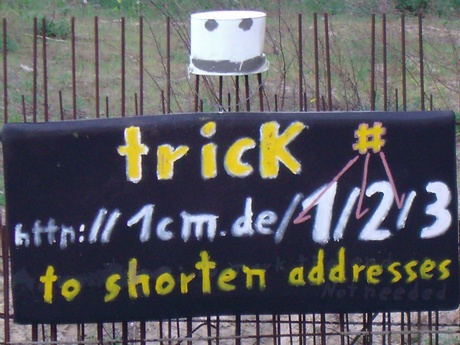
ÿþ<!DOCTYPE HTML PUBLIC "-//W3C//DTD HTML 4.01 Transitional//EN"> <html><head> <meta content="text/html; charset=ISO-8859-1" http-equiv="content-type"><title>AddressTRICK.tk -_- to shorten web addresses with "#" /x - /y shortADDR. 1cm.de/1</title> <style type="text/css">A:link { TEXT-DECORATION: none}A:visited {TEXT-DECORATION: non}A:hover {TEXT-DECORATION: line-through} A:active {TEXT-DECORATION: non} </style></head> <body> <center><h3><big>Address<big><span style="color: rgb(255, 0, 0);">TRICK</span></big>.tk<big style="font-family: Arial Black;"><span style="color: rgb(255, 0, 0); font-weight: bold;">#</span></big></big>Ä%__or__1kg.de</h3>with the following techniques you can save <span style="color: rgb(255, 0, 0); font-weight: bold;">more than the half</span>, commonly needed&nbsp; <span style="color: rgb(255, 0, 0);">time</span>&nbsp; <br><br>º%<span style="font-weight: bold;">access</span> <span style="color: rgb(51, 51, 255); font-weight: bold;">shortinfos</span>, code, hints + .. with <span style="font-weight: bold; color: rgb(255, 0, 0); font-style: italic;">l</span>ogical <span style="font-weight: bold; color: rgb(255, 0, 0); font-style: italic;">s</span>hortcuts <img style="" src="11.gif"> in the <a href="http://6.6.je"><span style="font-weight: bold;">taskbar</span></a>, Ie + explorer addressBar.<br><small>you can expand the addressbar +&nbsp; addr.menu for longer, in filenames saved,&nbsp; infos&nbsp;</small>&nbsp;&nbsp; <br><br>º% <span style="font-weight: bold;">access</span> webpages, files + folders&nbsp; with&nbsp;&nbsp;<span style="font-weight: bold; color: rgb(255, 0, 0); font-style: italic;">l</span>ogical&nbsp;<span style="font-weight: bold; color: rgb(255, 0, 0); font-style: italic;">s</span>hortcuts &nbsp;+ <span style="font-weight: bold;">ENTER</span> (or <span style="color: rgb(51, 51, 255);">’!</span> )&nbsp; &nbsp;( or starting letters + ENTER) <a href="http://address.initials.googlepages.com#__or__1mm.de">“!animation“!</a><br><small><span style="font-weight: bold;">requirements:</span> a bookmark/favorit,&nbsp; file or foldermame with an asigned shortcut</small>&nbsp;<small>&nbsp;+ <a href="http://address.initials.googlepages.com/inline#_autocomplieting">inline autocomplieting</a> <a title=".reg file for WIN xp" href="http://1cm.de/y.reg#__only_for_WIN_xp" target="_blank">.reg</a></small>&nbsp; &nbsp; <br><br>º% <span style="font-weight: bold;">to shorten addresses</span> &nbsp;(+ switching &nbsp;from /x to /y)&nbsp;&nbsp;<br>" by hiting "<span style="color: rgb(255, 0, 0);">#</span>" + "<span style="color: rgb(255, 0, 0);">ENTER</span>" with one hand movement&nbsp; i.e. on the german keyboard <br>" <span style="font-weight: bold;">recommended</span> by inserting&nbsp;"<span style="color: rgb(255, 0, 0);">#</span>" + "<span style="color: rgb(255, 0, 0);">ENTER</span>" with a&nbsp; <a href="http://streetartblog.info/mbutton.exe">middle mouse click</a> &nbsp;or by&nbsp; hiting the <a title="download it into the ``autostart´´ folder or drag a shortcut into the autostart folder or click the file for one session" href="http://streetartblog.info/rwin.exe">right win key</a> or&nbsp; <a href="http://streetartblog.info/ins.exe">ins key</a> &nbsp; <br><small>after&nbsp; downloading &nbsp; at least one of the &nbsp; <a title="open source software" href="http://autohotkey.com/#__published_with_GNU_licenc" target="_blank">AUTOhotkey‘!</a> scripts &nbsp;to the <span style="font-weight: bold;">startup</span> folder ( rightclick , save as ) &nbsp;<a href="http://address.initials.googlepages.com/script" target="blank">script sources + infos</a> </small><br><br> <a href="http://www.23hq.com/sex/photo/2787080#____or__thumbs__23hq.com/sex/addresstrick"><img src="http://www.23hq.com/23666/2787080_76584cbb05fde4bbde499def7c379168_standard.jpg"></a><br><big><b>advantage</b></big> you must not highlight and delete the end of the address <br><b>switching to another username/dir/account i.e. @ <a title="flickr.de/screenshot#/addressTRICK" href="http://flickr.de/screenshot#/addressTRICK" target="_blank">flickr</a> +..</b> º% insert ``<font color="red">username#</font>´´ i.e. <a href="http://myspace.com/addresstrick#4rt/">myspace.com/<font color="red">addresstrick#</font>4rt/</a> <br><span style="font-weight: bold;"></span>&nbsp;<br> <br><big>script help <small>download a</small> <a title="open source software" href="http://AUTOhotkey.com#__published_with_GNU_licenc" target="_blank">AUTOhotkey</a> <small>scripts to your startUP&nbsp; folder</small></big> <br><span style="font-weight: bold;">or</span> º%drag and drop a shortcut from the scripts&nbsp; to the startUP &nbsp;folder ( <small>Drag it to START , all programs , startUP </small>&nbsp;)&nbsp;<br>&nbsp; º%activate the scripts.exe with&nbsp; a click<br> <a title="click or rightclick + save target as" href="http://streetartblog.info/rwin.exe#__click_or__rightclick_save_target_as" target="_top"><span style="font-weight: bold;"></span></a><br>if you don´t trust the scripts, you can use a microsoft mouse and the <a href="http://microsoft.com/hardware/download/download.aspx?category=MK">intellipoint software</a> or the A4tech mouse wop35 with 5 keys &nbsp;<a href="http://streetartblog.info/intellipoint.jpg" target="_blank">makro creating</a><br><br>the biggest benefit:<span style="color: rgb(255, 0, 0); font-style: italic;"> <span style="font-weight: bold;">l</span></span>ogical <span style="color: rgb(255, 0, 0); font-weight: bold; font-style: italic;">s</span>hortcuts for webpages + files + address mail forms<br><br> <center><embed src="http://address.initials.googlepages.com/1.swf" height="301" width="466"><div style="text-align: center;"><font size="2"><span style="font-family: arial,sans-serif;"><font size="4"><span style="font-weight: bold;"><span style="font-style: italic;"></span></span></font></span></font></div></center><center><font size="2"><span style="font-family: arial,sans-serif;"><b><br></b></span></font></center><b>DEMO</b>‘! how to open 2 webpages, a folder<font size="2">*</font> + <b>addressed</b> e-mail forms<font size="2">*</font> in mozilla FireFox <br style="font-family: arial,sans-serif;"><span style="font-family: arial,sans-serif;"><font size="2"><br>The typed shortcuts , <b style="color: rgb(255, 0, 0);"><i>a</i></b>ddress.<b style="color: rgb(255, 0, 0);"><i>i</i></b>nitials: </font><a href="http://xn--74h.blogspot.com/#_______shortADDR.:___%E2%98%BA.tk____+____%E2%98%BA.6x.to___ads_free" title=" site content: :& photos + ALT codes"><font style="font-weight: bold;" size="4">:&</font></a><font size="2"> , <font size="4"><a href="http://xn--g6h.tk/#____flickr_account_with__a__shortDomain" title="in the flash demo used to open a addressed form 'to my e&'">e&</a></font></font></span><font color="blue" size="2"><span style="font-family: arial,sans-serif;"> ,<i> 4</i></span><font face="Arial">,</font><b><i> mf</i></b><span style="font-family: arial,sans-serif;"><b> + </b><span><b><i>ai </i></b><font color="#000000">, </font></span></span></font>finished with <b>[<i>ENTER</i>] </b><span style="font-family: arial,sans-serif;"><font size="1"><b><a href="http://ALTcode.tk/#__symbols_#1-#9" title="alt codes #1 - #9 :& ;& e& f& c& `& " Ø% Ë%">ALTcode.tk#_:&=1_e&=3</a></b></font></span><font size="1"><span style="font-family: arial,sans-serif;"></span></font><span style="font-family: arial,sans-serif;"></span><span style="font-family: arial,sans-serif;"><br><br></span>&nbsp;<br><a href="http://1cm.de/i#mprint">1cm.de/i#mprint</a> -_- © <a href="4rtist.com#">4rtist.com#%%%%%ˆ%ˆ%ˆ%ˆ%ˆ%ˆ%ˆ%ˆ%ˆ%ˆ%P%P%P%P%ˆ%</a> </center></body></html>